Creating Surveys with QML
This guide explains how to create surveys using QML (Questionnaire Markup Language), a YAML-based language designed for sophisticated questionnaires with formal verification, dynamic flow control, and data validation.
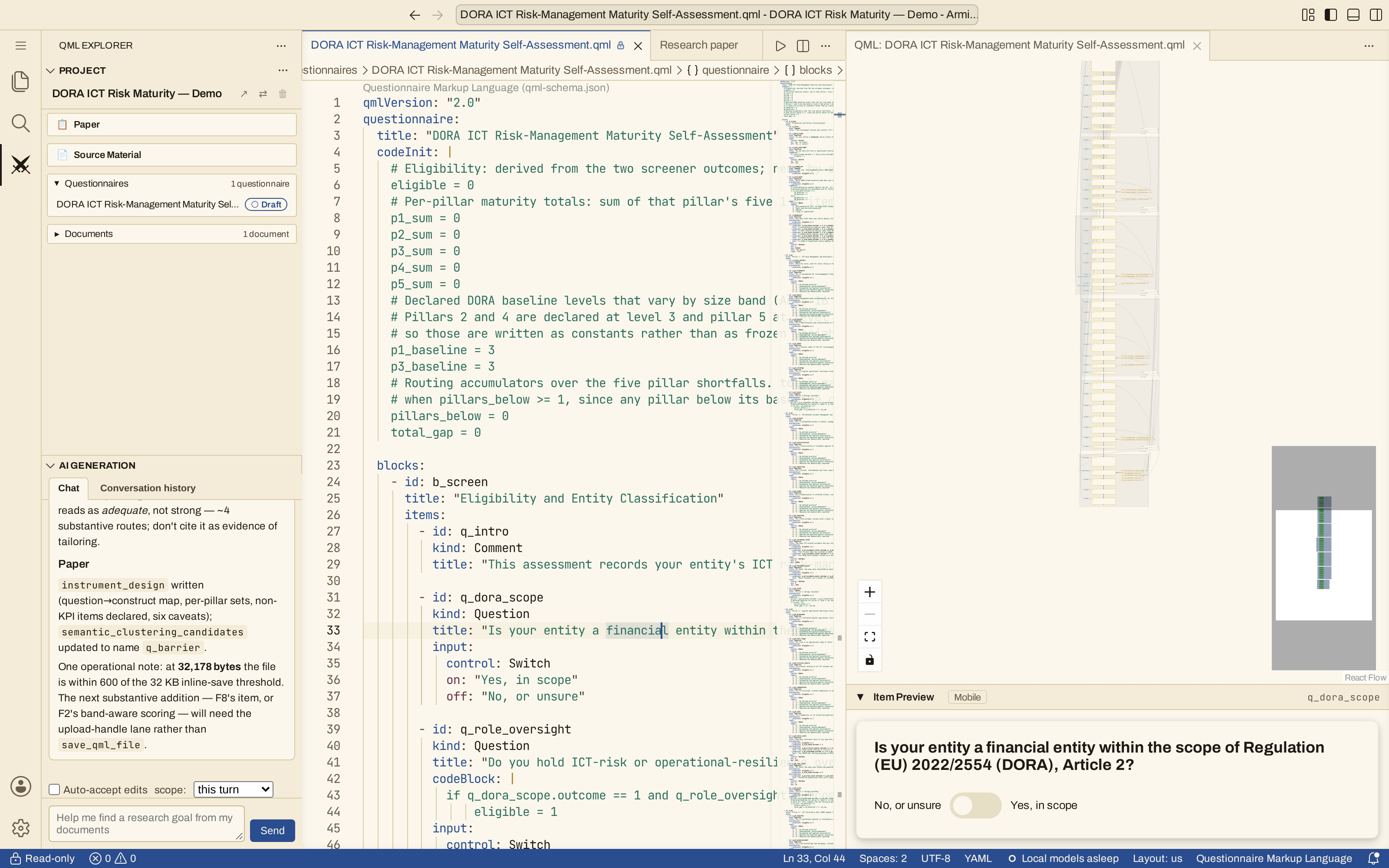
The Armiger browser editor: the project explorer and AI Generation chat (left), QML code (center), the flow diagram and a live preview of the selected question (right).
Quick Start
Every QML questionnaire begins with this structure:
qmlVersion: "2.0"
questionnaire:
  title: "Your Survey Title"
  blocks:
    - id: b_first_section
      title: "First Section"
      items:
        - id: q_first_question
          kind: Question
          title: "Your first question"
          input:
            control: Radio
            labels:
              1: "Option 1"
              2: "Option 2"
The qmlVersion field declares the QML major version your document targets. The current major is 2, so write "2.0" (or "2.1" to use the newest optional features). Documents written for the old 1.x grammar no longer load and must be migrated. For the full grammar, item kinds, and advanced blocks, see the QML Syntax reference.
Core Concepts
Blocks: Organizing Your Survey
A block has three jobs:
- Grouping: it collects related questions into a section.
- Branching: its precondition gates every question in it, so one condition decides whether a respondent sees the whole run.
- Repetition: a
Rosterblock asks its questions once per selected entity (see Advanced Block Kinds).
The simplest use is grouping:
blocks:
  - id: b_demographics
    title: "About You"
    items:
      # Questions about the respondent

  - id: b_preferences
    title: "Your Preferences"
    items:
      # Questions about preferences
Block-Level Preconditions
Blocks can have their own preconditions. When a block has a precondition, it automatically applies to every item within that block — you don't need to repeat the same condition on each question.
blocks:
  - id: b_employment
    title: "Employment Details"
    precondition:
      - predicate: q_employed.outcome == 1
    items:
      - id: q_job_title
        kind: Question
        title: "What is your job title?"
        input:
          control: Dropdown
          labels:
            1: "Manager"
            2: "Professional"
            3: "Technician"

      - id: q_years_employed
        kind: Question
        title: "How many years have you worked there?"
        input:
          control: Editbox
          min: 0
          max: 50
In this example, both q_job_title and q_years_employed inherit the block precondition q_employed.outcome == 1. Items can also define their own additional preconditions — the block precondition is combined with any item-level preconditions.
Best practices:
- Use descriptive IDs starting with
b_(e.g.,b_demographics,b_experience) - Group thematically related questions
- Keep dependencies within blocks when possible
- When two or more questions share one visibility condition, put them in their own block and write the condition once, on the block; keep an item-level precondition only for a condition specific to that question
- A block precondition reads answers and variables from questions before the block, so place the block after the question that decides it
Advanced Block Kinds
By default a block is a Group that asks each of its items once. Two optional variations handle more dynamic surveys:
- Repeating sections (
Roster) — repeat a set of questions once per selected item (for example, ask the same details about each meal a respondent ate, or each family member). - Adaptive draws (
count) — cap aGroupso it asks only the first N eligible items (for example, show 3 questions from a larger pool).
Both are covered in detail, with examples, in the QML Syntax reference.
Items: Types of Questions
QML supports four item types:
1. Comment (Instructions)
Display text without collecting responses:
2. Question (Single Response)
Ask one question and collect one response:
3. QuestionGroup (Multiple Related Questions)
Ask several questions with the same response format:
- id: q_satisfaction
  kind: QuestionGroup
  title: "Rate your satisfaction with:"
  questions:
    - "Customer service"
    - "Product quality"
    - "Delivery speed"
  input:
    control: Radio
    labels:
      1: "Very Dissatisfied"
      2: "Dissatisfied"
      3: "Neutral"
      4: "Satisfied"
      5: "Very Satisfied"
4. MatrixQuestion (Grid)
Collect responses in a row-by-column format:
- id: q_skills
  kind: MatrixQuestion
  title: "Rate your proficiency in:"
  rows:
    - "Python"
    - "JavaScript"
    - "SQL"
  columns:
    - "Beginner"
    - "Intermediate"
    - "Advanced"
  input:
    control: Radio
    labels:
      1: "No experience"
      2: "Some experience"
      3: "Proficient"
Input Controls
Every question must specify how responses are collected.
Switch (Yes/No)
Binary choice:
Radio (Choose One)
Select one option from several:
Checkbox (Choose Multiple)
Select zero or more options:
Checkbox Values
Checkbox option keys must be powers of 2 (1, 2, 4, 8, 16...) — the platform rejects any other key. Selected options are combined with bitwise OR, so the outcome is the sum of the selected keys (e.g. options 1 and 4 selected → outcome 5).
Dropdown (Choose from List)
Compact selection from many options:
input:
  control: Dropdown
  labels:
    1: "High School"
    2: "Bachelor's"
    3: "Master's"
    4: "PhD"
  left: "Education:"
Editbox (Number Input)
Free-form number entry:
Slider (Visual Scale)
Visual selection along a scale:
Range (Interval Selection)
Select an interval with two thumbs (from-to). The answer is a pair [low, high] with min <= low <= high <= max.
input:
  control: Range
  min: 0
  max: 100
  step: 5
  labels:
    0: "Minimum"
    50: "Mid"
    100: "Maximum"
  default: [20, 80]
Reading a Range answer
Conditions read the two ends by name: q_budget.outcome.low is the low end, q_budget.outcome.high the high end (for example q_budget.outcome.high - q_budget.outcome.low <= 10). A default is a pair too. In exports, each Range answer becomes two numeric columns, <variable>_low and <variable>_high. See QML Syntax for groups, matrices and which Range conditions the validator verifies.
Textarea (Free Text)
For open-ended, qualitative answers, use Textarea. Unlike every other control, its outcome is a string, not an integer — so it is not available for branching logic or formal verification (referencing a Textarea outcome in a precondition, postcondition, or code block is a design error). Use it for comments, suggestions, or explanations you plan to read or code later.
Both placeholder (hint text shown while empty) and maxLength (character limit) are optional.
Conditional Logic
Showing Questions Conditionally (Preconditions)
Use preconditions to show questions based on previous answers:
- id: q_has_car
  kind: Question
  title: "Do you own a car?"
  input:
    control: Switch

- id: q_car_brand
  kind: Question
  title: "What brand is your car?"
  precondition:
    - predicate: q_has_car.outcome == 1
  input:
    control: Dropdown
    labels:
      1: "Toyota"
      2: "Honda"
      3: "Ford"
The q_car_brand question only appears if the respondent answered "Yes" to owning a car.
Complex preconditions:
Seeing the Branches: the Diagram's Tree View
The flow diagram beside your QML has two views, switched with Spine and Tree in its top-left corner.
- Spine (the default) shows every question in the order the interview asks it, with its conditions beside it.
- Tree shows the same questions as branches. Questions that share one condition, whether it is written on their block or repeated on each question, form one branch, and a branch whose condition can only hold inside another is drawn inside it. A screener's "yes" and "no" paths appear side by side, and a follow-up that is asked only on the "yes" path is nested in it.
The relations are proved with Z3, not guessed from the text. The tree is computed when you switch to it, so the first switch takes a moment; if it cannot be computed, the diagram stays on the spine and says why. Each branch is labelled with what Z3 established:
| Mark | Meaning |
|---|---|
| either/or | This branch and its neighbour can never both apply: the respondent takes one path or the other |
| parallel | Both can apply to the same respondent: optional runs that may both be asked |
| ? exclusive, ? nested, ? holds | Z3 could not decide (for example a condition it cannot fully express, or one about an answer or a computed value at two different moments of the interview): the branch is shown where it is proved, and the mark says what is undecided |
| never / always | The branch's condition can never hold, or always holds |
Two questions with the same condition text are one branch only when the condition means the same thing for both: if a code block between them changes a variable the condition reads, each gets its own branch.
Postconditions do not branch, so they stay beside their questions in both views.
Validating Responses (Postconditions)
Use postconditions to ensure logical consistency:
- id: q_household_size
  kind: Question
  title: "How many people live in your household?"
  input:
    control: Editbox
    min: 1
    max: 20

- id: q_children
  kind: Question
  title: "How many children under 18 live in your household?"
  postcondition:
    - predicate: q_children.outcome < q_household_size.outcome
      hint: "Number of children must be less than household size"
  input:
    control: Editbox
    min: 0
    max: 15
If a respondent enters invalid data (e.g., 5 children in a household of 3), the hint message is shown.
Code Blocks and Variables
QML allows embedded Python code for calculations and dynamic logic.
Initializing Variables
Use codeInit to set up tracking variables:
Computing After Responses
Attach code blocks to items to run calculations:
- id: q_satisfaction
  kind: Question
  title: "Rate your overall satisfaction (0-10)"
  codeBlock: |
    # Calculate satisfaction category
    if q_satisfaction.outcome >= 9:
        satisfaction_category = 3  # Promoter
    elif q_satisfaction.outcome >= 7:
        satisfaction_category = 2  # Passive
    else:
        satisfaction_category = 1  # Detractor

    # Add to running total
    total_score += q_satisfaction.outcome
  input:
    control: Slider
    min: 0
    max: 10
Global Variables
All variables in QML are global. Variables created in any code block are accessible everywhere.
Supported Python Features
QML code runs in a sandbox, but only a subset of Python can be translated into the formal (Z3) model that verifies your questionnaire. Stay inside this subset so your logic is covered by verification:
✓ Verified subset:
- Arithmetic:
+,-,*,//,% - Comparisons:
<,<=,>,>=,==,!=(including chained, e.g.0 < x < 10) - Membership:
in,not in(e.g.q_x.outcome in [1, 2, 3]) - Boolean logic:
and,or,not - Conditionals:
if,elif,else - Ternary expressions:
x = 1 if condition else 0 - For loops:
for i in range(n)(n ≤ 20) - List, tuple, set literals (≤ 20 elements)
- Tuple unpacking:
a, b = 1, 0 - Variable assignment:
x = value,x += value - Built-in functions:
range(),abs(),int(),bool() - Accessing outcomes:
q_age.outcome
✗ Outside the verified subset (see note below):
- Imports, functions, classes
- While loops,
break,continue - Dictionary operations
- String methods
- List comprehensions
- Print statements (silently ignored)
Verified vs. runtime
The sandbox that runs your survey is more permissive than the verifier. Some of the "outside" constructs above will still execute at runtime — but any logic that uses them cannot be lowered to the formal model, so it is not covered by the mathematical proof and won't be reflected in reachability or consistency checks. Keep preconditions, postconditions, and any code that drives branching inside the verified subset.
Common Patterns
Progressive Disclosure
Show questions progressively based on prior answers. Use block-level preconditions to avoid repeating the same condition on every item:
- id: b_screening
  items:
    - id: q_employed
      kind: Question
      title: "Are you currently employed?"
      input:
        control: Switch

- id: b_employment
  precondition:
    - predicate: q_employed.outcome == 1
  items:
    - id: q_job_title
      kind: Question
      title: "What is your job title?"
      input:
        control: Dropdown
        labels:
          1: "Manager"
          2: "Professional"
          3: "Technician"

    - id: q_years_employed
      kind: Question
      title: "How many years have you worked there?"
      input:
        control: Editbox
        min: 0
        max: 50
Both q_job_title and q_years_employed automatically inherit the block's precondition — they only appear when the respondent is employed.
Scoring and Categorization
Calculate scores and categorize respondents:
questionnaire:
  codeInit: |
    risk_score = 0

blocks:
  - id: b_assessment
    items:
      - id: q_factor1
        kind: Question
        title: "Do you smoke?"
        codeBlock: |
          if q_factor1.outcome == 1:
              risk_score += 20
        input:
          control: Switch

      - id: q_factor2
        kind: Question
        title: "Do you exercise regularly?"
        codeBlock: |
          if q_factor2.outcome == 0:
              risk_score += 15
        input:
          control: Switch

      - id: q_result
        kind: Comment
        title: "Assessment complete"
        codeBlock: |
          if risk_score >= 30:
              risk_category = "high"
          elif risk_score >= 15:
              risk_category = "moderate"
          else:
              risk_category = "low"
Data Quality Validation
Ensure response quality with cross-item validation:
- id: q_age
  kind: Question
  title: "Your age"
  input:
    control: Editbox
    min: 18
    max: 100

- id: q_work_experience
  kind: Question
  title: "Years of work experience"
  postcondition:
    - predicate: q_work_experience.outcome <= (q_age.outcome - 16)
      hint: "Work experience cannot exceed your potential working years"
  input:
    control: Editbox
    min: 0
    max: 60
Best Practices
Question Design
- Be specific: "What is your annual household income?" vs "Income?"
- Use appropriate controls: Editbox for precise numbers, Slider for subjective ratings
- Set realistic ranges: min/max should reflect real-world constraints
- Provide context: Use
left/righttext for units and clarifications
Dependency Management
- Keep related items together in the same block
- Order matters: Questions must appear before they are referenced
- Test all paths: Ensure every question can be reached
Validation Strategy
- Set domain constraints via input control min/max
- Use postconditions for logical consistency
- Provide helpful hints: Clear error messages guide respondents
- Consider edge cases: What if someone enters extreme values?
Code Block Guidelines
- Initialize early: Set up variables in
codeInit - Keep it simple: Complex calculations can be hard to debug
- Remember scope: All variables are global
- Test thoroughly: Run the questionnaire validator
Formal Verification
QML questionnaires are automatically validated for:
- Reachability: Can every question be reached?
- Consistency: Are validation rules satisfiable?
- Cycles: Do dependencies form cycles?
- Completeness: Is there at least one valid completion path?
The validator uses mathematical analysis (SMT solving) to detect design errors before deployment.
See the Theory section for mathematical details.
Complete Example
qmlVersion: "2.0"
questionnaire:
  title: "Customer Feedback Survey"
  codeInit: |
    nps_score = 0
    follow_up_needed = 0

  blocks:
    - id: b_intro
      title: "Welcome"
      items:
        - id: q_welcome
          kind: Comment
          title: "Thank you for taking our survey. It will take about 3 minutes."

    - id: b_experience
      title: "Your Experience"
      items:
        - id: q_nps
          kind: Question
          title: "How likely are you to recommend us? (0 = Not at all, 10 = Extremely likely)"
          codeBlock: |
            nps_score = q_nps.outcome
            if nps_score <= 6:
                follow_up_needed = 1
          input:
            control: Slider
            min: 0
            max: 10
            labels:
              0: "Not likely"
              5: "Maybe"
              10: "Very likely"

        - id: q_reason
          kind: Question
          title: "What is the primary reason for your score?"
          precondition:
            - predicate: follow_up_needed == 1
          input:
            control: Dropdown
            labels:
              1: "Product quality"
              2: "Customer service"
              3: "Pricing"
              4: "Other"

        - id: q_aspects
          kind: QuestionGroup
          title: "Please rate these aspects:"
          questions:
            - "Product quality"
            - "Customer service"
            - "Value for money"
          input:
            control: Radio
            labels:
              1: "Poor"
              2: "Fair"
              3: "Good"
              4: "Excellent"

    - id: b_closing
      title: "Thank You"
      items:
        - id: q_comments
          kind: Comment
          title: "Thank you for your valuable feedback!"