AI-Assisted Questionnaire Generation
This document describes the AI-assisted questionnaire generation feature that helps researchers create logically sound, comprehensive surveys by combining natural language understanding with formal mathematical validation.
Overview
AI-assisted questionnaire generation uses two specialized AI agents that collaborate to transform research briefs and source documents into formally verified QML questionnaires:
| Phase | Agent(s) | Responsibility |
|---|---|---|
| Phase 1: Research | Research Agent | Ingest and index documents, extract measurable concepts, produce a structured research document |
| Phase 2: Design | Planner + Block Generators | Decompose research into blocks, generate QML in parallel, assemble and validate with SMT solver |
The agents share a continuous conversation thread — the user interacts with both through the same chat interface. The transition between phases happens when the user approves the research document, which serves as the handoff brief from the Research Agent to the Designer Agent.
Key Capabilities
- Semantic document indexing with pgvector for intelligent retrieval across large document sets
- Natural language understanding to interpret research objectives and extract quantitative dimensions
- Domain expertise to recommend appropriate question types and response scales
- Formal verification using SMT solvers (Z3) to ensure logical consistency
- Iterative refinement to fix validation issues automatically
- Project-scoped isolation ensuring research documents stay within team boundaries
Research Domain Support
The system supports a wide range of research domains:
| Domain | Examples | Typical Focus |
|---|---|---|
| Sociology | Social attitudes, demographic studies, community surveys | Population characteristics, behavioral patterns |
| Market Research | Consumer preferences, brand perception, product testing | Purchasing behavior, satisfaction metrics |
| Health & Medical | Patient outcomes, clinical trials, wellness assessments | Symptom tracking, treatment efficacy, quality of life |
| Political | Voter preferences, policy opinions, election polling | Party support, issue importance, demographic cross-tabs |
| Risk & Compliance | Internal controls, regulatory compliance, risk assessment | Control effectiveness, compliance gaps, risk exposure |
| Due Diligence | Vendor assessment, M&A analysis, background checks | Financial health, operational risks, reputational factors |
| Procurement | Supplier evaluation, contract compliance, bid assessment | Capability verification, pricing analysis, SLA adherence |
| IT Security | Threat analysis, vulnerability assessment, security posture | Risk vectors, control coverage, incident history |
| Conflict of Interest | Ethics disclosures, relationship mapping, independence verification | Financial relationships, personal connections, decision influence |
Two-Agent Architecture
flowchart LR
    subgraph phase1["Phase 1: Research Agent"]
        docs[Source Documents] --> index[Semantic Indexing]
        brief[Research Brief] --> analyze[Analysis & Synthesis]
        index --> analyze
        analyze --> rdoc[Research Document]
    end

    rdoc --> approve{User Approval}

    subgraph phase2["Phase 2: Designer Agent"]
        approve -->|Approved| plan[Block Planning]
        plan --> parallel["Parallel Generation<br/>(3 concurrent)"]
        parallel --> assemble[Assembly + Validation]
        assemble --> output[Validated QML]
    end
The Research Agent and Designer Agent share the same conversation history. When the user approves the research document, the session transitions from Phase 1 to Phase 2 seamlessly — the Designer Agent picks up the full context including all prior messages, indexed documents, and the approved research document.
Phase 1: Research Agent
The Research Agent processes source documents, engages in clarifying dialogue with the researcher, and produces a structured research document that captures all requirements for questionnaire design.
Document Indexing Pipeline
Large research projects often involve extensive source materials. The Research Agent processes these through a semantic indexing pipeline for intelligent retrieval.
flowchart TD
    subgraph input["Input Layer"]
        docs[Source Documents]
        prompt[Research Brief]
    end

    subgraph indexing["Semantic Indexing"]
        ingest[Markdown Conversion] --> chunk["Two-Pass Chunking<br/>(headings → sentences)"]
        chunk --> embed[Vector Embedding]
        embed --> store[pgvector Storage]
    end

    subgraph analysis["Research Analysis"]
        store --> retrieve[Semantic Retrieval]
        retrieve --> extract[Key Concept Extraction]
        extract --> quantify[Quantifiable Dimension Identification]
    end

    subgraph synthesis["Research Synthesis"]
        quantify --> themes[Theme Clustering]
        prompt --> themes
        themes --> chapters[Chapter Identification]
        chapters --> rdoc[Research Document]
    end

    docs --> ingest

    rdoc --> approval[User Approval]
Semantic Indexing
When users upload or reference documents (via @ mentions in the chat), the Research Agent indexes them for intelligent retrieval:
- Conversion — Documents are converted to structured markdown that preserves headings, tables, and formatting. PDF documents retain page markers for source citation
- Chunking — A two-pass pipeline splits documents intelligently: first at heading boundaries to preserve section structure, then at sentence boundaries for any oversized sections. Chunk sizes are dynamically derived from the embedding model's context window
- Embedding — Each chunk is embedded using the BGE-M3 model via the platform's local Ollama instance, producing dense vector representations. This is the only step that uses local inference — all agent reasoning uses a cloud AI provider (Anthropic, AWS Bedrock, or OpenAI)
- Storage — Chunks and their embeddings are stored in PostgreSQL with pgvector for cosine similarity search. Re-indexing is skipped for unchanged files (detected via file size and content hash)
- Retrieval — When the researcher asks a question, the most relevant chunks are retrieved semantically and included in the agent's context
This means the Research Agent can handle large document sets (hundreds of pages) without losing relevant details — it retrieves exactly the chunks needed for each part of the conversation.
Project-Scoped Document Isolation
Indexed documents are scoped by the active project to ensure research confidentiality:
- In non-private organizations, documents indexed during a session are only visible to users working on the same project. A researcher on "Customer Satisfaction 2026" cannot search documents indexed by another team working on "Employee Engagement Q1".
- In private organizations, all indexed documents are shared organization-wide, consistent with the collaborative trust model.
The project selector in the Armiger AI panel determines which project documents are indexed into. See Organization-Based Data Sharing for details on isolation modes.
MCP Document Tools
The Research Agent can use Portor's document discovery tools to explore indexed content conversationally:
| Tool | Purpose |
|---|---|
list_indexed_documents |
Show all documents indexed in the current project |
get_document_summary |
Get metadata and chunk count for a specific document |
search_by_keyword |
Full-text keyword search across indexed chunks |
get_document_chunk |
Retrieve a specific chunk by file and index |
Document Ingestion
The Research Agent accepts multiple document formats, converting each to structured markdown that preserves headings, tables, and formatting:
- PDF documents (reports, research papers, regulations) — with page markers for source citation
- Word documents (briefs, specifications, guidelines) — preserving document structure
- Spreadsheets (data dictionaries, variable lists, coding schemes) — with table formatting
- Presentations (PowerPoint slides with text and tables)
- Text files (transcripts, notes, requirements)
For large document sets, the Research Agent:
- Indexes all documents with semantic chunking and vector embedding
- Identifies document types (regulatory, academic, operational, etc.)
- Establishes cross-references between related documents
- Prioritizes by relevance to the research brief using cosine similarity search
Concept Extraction
From the ingested documents, the Research Agent extracts:
| Extraction Type | Description | Example |
|---|---|---|
| Key entities | Organizations, roles, processes mentioned | "Audit Committee", "Risk Manager", "Monthly Review" |
| Measurable constructs | Concepts that can be quantified | "Satisfaction level", "Frequency of occurrence", "Severity rating" |
| Categorical variables | Discrete classification dimensions | "Department", "Region", "Product category" |
| Relationships | Dependencies between concepts | "Satisfaction correlates with retention" |
| Constraints | Rules and requirements that affect question logic | "Only applicable if revenue > $10M" |
Quantifiable Dimension Identification
The Research Agent identifies aspects of the research that can be measured through survey questions:
Document excerpt: "Employees must report conflicts of interest annually.
                   The policy requires disclosure of financial interests
                   exceeding $5,000 and any family relationships with
                   vendors or competitors."

Extracted dimensions:
┌─────────────────────────────┬────────────────────────────────────┐
│ Dimension                   │ Measurement Approach               │
├─────────────────────────────┼────────────────────────────────────┤
│ Reporting compliance        │ Yes/No + date of last disclosure   │
│ Financial interest amount   │ Numeric range with thresholds      │
│ Relationship types          │ Multiple selection (family types)  │
│ Entity categories           │ Checkbox (vendor, competitor, etc) │
└─────────────────────────────┴────────────────────────────────────┘
Chapter Identification
For comprehensive research projects, the Research Agent organizes the questionnaire into logical chapters:
User: "Create a questionnaire for evaluating IT security posture
       across our organization"

Research Agent: Based on the security framework documents provided, I recommend
    organizing the questionnaire into 6 chapters:

    Chapter 1: General Information (10 questions)
    - Organization details, respondent role, IT environment scope

    Chapter 2: Access Control (15 questions)
    - Authentication methods, authorization policies, privilege management

    Chapter 3: Network Security (12 questions)
    - Perimeter protection, segmentation, monitoring capabilities

    Chapter 4: Data Protection (14 questions)
    - Classification, encryption, backup, retention policies

    Chapter 5: Incident Response (11 questions)
    - Detection capabilities, response procedures, recovery testing

    Chapter 6: Compliance & Governance (8 questions)
    - Regulatory requirements, audit findings, policy currency

    Would you like me to proceed with this structure, or would you
    prefer to modify the chapter organization?
Researcher Alignment
Before producing the research document, the Research Agent engages in a structured dialogue to ensure alignment with research objectives.
Clarification Questions
The Research Agent asks targeted questions to refine requirements:
Research Agent: I've analyzed your research brief on customer satisfaction.
    Before generating the questionnaire, I need to clarify a few points:

    1. Target Population
       Who are the intended respondents?
       [ ] All customers
       [ ] Recent purchasers (last 30/90/180 days)
       [ ] Specific product line users
       [ ] High-value customers only

    2. Response Format Preference
       For satisfaction ratings, which scale do you prefer?
       [ ] 5-point Likert (Strongly Disagree -> Strongly Agree)
       [ ] 7-point Likert (more granular)
       [ ] 0-10 NPS-style scale
       [ ] Let AI recommend based on analysis type

    3. Open-Ended Questions
       Should the questionnaire include free-text responses?
       [ ] Yes, after key sections
       [ ] Yes, only at the end
       [ ] No, quantitative only

    4. Estimated Completion Time
       What's the acceptable survey length?
       [ ] Under 5 minutes (~15-20 questions)
       [ ] 5-10 minutes (~25-40 questions)
       [ ] 10-15 minutes (~40-60 questions)
       [ ] Comprehensive (60+ questions, with progress saves)
Research Design Validation
The Research Agent validates that the proposed questionnaire design matches research methodology:
Research Agent: Based on your research objectives, I've identified the following
    analytical requirements:

    Statistical Analysis Planned:
    ┌─────────────────────────┬─────────────────────────────────────┐
    │ Analysis Type           │ Questionnaire Implication           │
    ├─────────────────────────┼─────────────────────────────────────┤
    │ Cross-tabulation        │ Need categorical demographics       │
    │ Regression analysis     │ Need continuous outcome variables   │
    │ Factor analysis         │ Need multiple items per construct   │
    │ Segment comparison      │ Need clear grouping variables       │
    └─────────────────────────┴─────────────────────────────────────┘

    Recommended additions:
    - Add 3 demographic questions to enable cross-tabulation
    - Include 4-item scales for key constructs to support factor analysis
    - Add "segment identifier" question for group comparisons

    Accept these recommendations?
Research Document & Approval Gate
Once alignment is complete, the Research Agent produces a structured research document that captures all requirements, extracted dimensions, chapter structure, and design decisions from the conversation. This document serves as the handoff brief to the Designer Agent.
The user reviews the research document and clicks Approve to transition to Phase 2. The approved document is saved to the workspace as research-brief-{session-id}.md for reference.
Open Questions Detection
When you click Approve, the system checks if the Research Agent left any unanswered questions in its last message. If open questions are detected, you'll see a warning listing them — you can choose to continue researching or proceed anyway.
Research Agent: I've compiled the research document based on our discussion.
               It covers 6 chapters with 85 questions across the following themes:

               [Structured research document with chapters, dimensions,
                question types, and design rationale]

               Please review and approve to proceed with QML generation.

User: [Clicks "Approve Research"]

               → Session transitions to Phase 2 (Design)
               → Research document saved to workspace
               → Designer Agent takes over
Phase 2: Designer Agent
The Designer Agent receives the approved research document along with the full conversation history and uses a block-parallel generation strategy that splits work into independent sections for faster, more reliable generation.
flowchart TD
    subgraph planning["Block Planning"]
        input[Approved Research Document] --> plan[Decompose into Blocks]
        plan --> blocks["4-10 Independent Blocks"]
    end

    subgraph parallel["Parallel Block Generation"]
        blocks --> b1[Block 1: Demographics]
        blocks --> b2[Block 2: Satisfaction]
        blocks --> b3[Block 3: ...]
        blocks --> bn[Block N: Summary]
        b1 --> v1[Validate & Correct]
        b2 --> v2[Validate & Correct]
        b3 --> v3[Validate & Correct]
        bn --> vn[Validate & Correct]
    end

    subgraph assembly["Assembly"]
        v1 --> assemble[Topological Sort & Stitch]
        v2 --> assemble
        v3 --> assemble
        vn --> assemble
        assemble --> final_v[Final Validation]
        final_v --> output[Complete QML]
    end

    subgraph feedback["Feedback Loop"]
        output --> review[Researcher Review]
        review --> test[Test in SirWay]
        test --> changes{Changes<br/>Needed?}
        changes -->|Yes| regen[Regenerate]
        changes -->|No| final[Final Questionnaire]
    end
Block Planning
The Planner Agent analyzes the approved research document and decomposes it into 4-10 independent thematic blocks, each with:
- A title and description
- A list of requirements to address (mapped to the REQ-* identifiers from the research document)
- Dependency declarations — which variables a block produces and which it depends on
- Estimated item count (typically 5-10 per block)
This decomposition enables parallel generation while preserving inter-block dependencies.
Parallel Block Generation
Each block is generated independently by a dedicated agent instance, with up to three blocks running concurrently. Each block agent:
- Generates QML items addressing its assigned requirements
- Validates via SMT solver (Z3) through MCP tools
- Auto-corrects any validation issues
- Returns a validated block fragment
The system requires at least half of the planned blocks to succeed before proceeding to assembly. If too many blocks fail, you'll be prompted to retry or refine the research document.
Assembly
Completed blocks are assembled into the final questionnaire using topological sort (Kahn's algorithm) based on declared variable dependencies. The assembler stitches block fragments into a complete QML file with proper nesting and ordering, then runs a final validation pass on the assembled result.
QML Generation
Each block agent generates QML code based on the approved research document:
Designer Agent: Generating Chapter 2: Access Control...

    Creating 15 questions covering:
    - Authentication mechanisms (4 questions)
    - Authorization policies (5 questions)
    - Privilege management (4 questions)
    - Access monitoring (2 questions)

    Applying QML best practices:
    - Using appropriate control types for each question
    - Setting realistic domain constraints (min/max)
    - Adding preconditions for conditional questions
    - Including postconditions for logical validation
    - Organizing items in dependency order

    Generated QML snippet:
- id: q_auth_methods
  kind: Question
  title: "Which authentication methods are used for system access?"
  input:
    control: Checkbox
    labels:
      1: "Username/password"
      2: "Multi-factor authentication (MFA)"
      4: "Single sign-on (SSO)"
      8: "Biometric authentication"
      16: "Hardware tokens"
      32: "Certificate-based"

- id: q_mfa_coverage
  kind: Question
  title: "What percentage of user accounts have MFA enabled?"
  precondition:
    - predicate: (q_auth_methods.outcome & 2) != 0
  input:
    control: Slider
    min: 0
    max: 100
    step: 5
    left: "0%"
    right: "100%"
    labels:
      0: "None"
      50: "Half"
      100: "All"
  postcondition:
    - predicate: q_mfa_coverage.outcome >= 0
      hint: "Please specify the MFA coverage percentage"
SMT Validation
The Designer Agent sends the generated QML to the SMT-based questionnaire validator via MCP tools. The validator performs three levels of analysis:
Level 1: Per-Item Validation
For each item, the validator checks:
| Check | Classification | Meaning |
|---|---|---|
| Precondition reachability | ALWAYS / NEVER / CONDITIONAL | Can this question ever be reached? |
| Postcondition validity | TAUTOLOGICAL / CONSTRAINING / INFEASIBLE | Does the validation rule make sense? |
Validation Report - Chapter 2: Access Control
=============================================

Item: q_auth_methods
  Precondition: ALWAYS (no dependencies)
  Postcondition: TAUTOLOGICAL (no constraints)
  Status: Valid

Item: q_mfa_coverage
  Precondition: CONDITIONAL (requires MFA selected)
  Postcondition: TAUTOLOGICAL
  Status: Valid

Item: q_password_complexity
  Precondition: CONDITIONAL (requires password auth)
  Postcondition: CONSTRAINING (enforces minimum length)
  Status: Valid

Item: q_token_expiry
  Precondition: NEVER (!)
  Issue: Precondition (q_auth_methods.outcome & 64) != 0
         references bit 64, but no label with value 64 exists
  Status: Error - unreachable question
Level 2: Global Consistency
The validator checks whether the entire questionnaire has at least one valid completion path:
Global Satisfiability Check
===========================

Formula: B AND (P_i => Q_i) for all items

Result: SAT (satisfiable)

Witness (example valid completion):
  q_auth_methods = 7 (password + MFA + SSO)
  q_mfa_coverage = 85
  q_password_complexity = 3 (complex)
  ...
Level 3: Path-Based Validation
For comprehensive validation, the system checks that no questions become unreachable due to accumulated constraints:
Accumulated Reachability Analysis
=================================

Item: q_privileged_account_review
  Direct precondition: q_has_privileged_accounts.outcome == 1
  Accumulated constraints: q_account_management.outcome >= 2

  Check: Can both conditions be satisfied simultaneously?
  Result: SAT (reachable on valid paths)

Item: q_legacy_system_access
  Direct precondition: q_has_legacy_systems.outcome == 1
  Accumulated constraints: q_modernization_complete.outcome == 1

  Check: Can both conditions be satisfied simultaneously?
  Result: UNSAT (!) (dead code - never reachable)
  Reason: If modernization is complete, legacy systems flag is forced to 0
Automatic Correction
When validation errors are found, the Designer Agent automatically generates corrections:
Designer Agent: Found 2 issues in Chapter 2. Applying corrections...

    Issue 1: q_token_expiry references non-existent bit flag
    ---------------------------------------------------------
    Original precondition:
      predicate: (q_auth_methods.outcome & 64) != 0

    Analysis: Bit 64 not in label set. Hardware tokens use bit 16.

    Correction:
      predicate: (q_auth_methods.outcome & 16) != 0

    Issue 2: q_legacy_system_access is dead code
    --------------------------------------------
    Original precondition:
      predicate: q_has_legacy_systems.outcome == 1

    Analysis: Earlier postcondition forces q_has_legacy_systems = 0
              when q_modernization_complete = 1, but the precondition
              of this question also requires q_modernization_complete = 1.

    Correction options:
    a) Remove the conflicting postcondition on q_modernization_complete
    b) Change this question's precondition to not require modernization
    c) Remove this question (if legacy systems are truly gone)

    Recommended: Option (a) - relax the postcondition

    Re-validating...

    All items now valid
Iteration Until Valid
Each block's generation cycle continues until:
- All per-item validations pass within the block
- Global consistency is confirmed
- No dead code exists (optional strictness level)
After assembly, a final validation pass checks cross-block consistency:
Validation Summary - Complete Questionnaire
===========================================

Blocks completed: 6/7 (1 failed, within threshold)
Final status: All validations passed

Per-item results:
  85/85 items have valid preconditions
  85/85 items have feasible postconditions
  0 items classified as dead code

Global consistency: SAT (valid completion exists)
Path coverage: All CONDITIONAL items reachable

QML ready for review.
QML Regeneration
If the generated questionnaire needs significant reworking, you can use the Regenerate QML button instead of making incremental edits. Regeneration preserves your research and learns from the previous attempt:
- Conversation insights are saved — The system extracts design decisions, preferences, and corrections from your generation conversation and adds them to the research document
- QML is discarded — The current QML file is deleted to start fresh
- Fresh generation begins — The block-parallel pipeline runs again, now informed by both the original research and the insights from the previous attempt
This means each regeneration attempt benefits from everything discussed before — the Designer Agent won't repeat mistakes you already corrected in conversation.
Customer Feedback Loop
After initial validation, the questionnaire enters a feedback cycle with the researcher. The Designer Agent remains active throughout this phase.
Testing in SirWay
The Designer Agent can create a test survey in SirWay for the researcher to experience:
Designer Agent: I've created a test instance of Chapter 2 in SirWay.

    Test URL: https://sirway.dev.askalot.io/survey/test-abc123

    You can:
    1. Walk through all question paths
    2. See how conditional logic works
    3. Test validation messages
    4. Experience the respondent interface

    The test includes debug mode showing:
    - Current variable values
    - Active preconditions
    - Postcondition status

    After testing, let me know what changes you'd like.
Incorporating Feedback
Researchers can request modifications through natural language:
User: "The MFA coverage question should only appear if they selected
       MFA as an authentication method. Also, add a follow-up question
       about MFA bypass procedures when coverage is below 100%."

Designer Agent: Understood. Making the following changes to Chapter 2:

    Change 1: q_mfa_coverage precondition
    -------------------------------------
    The precondition already checks for MFA selection:
      predicate: (q_auth_methods.outcome & 2) != 0

    This is correct (bit 2 = MFA). No change needed.

    Change 2: New question q_mfa_bypass
    ------------------------------------
    Adding new question after q_mfa_coverage:

    - id: q_mfa_bypass
      kind: Question
      title: "Are there documented procedures for MFA bypass in emergencies?"
      precondition:
        - predicate: q_mfa_coverage.outcome < 100
      input:
        control: Radio
        labels:
          1: "Yes, formally documented and tested"
          2: "Yes, but informal/ad-hoc"
          3: "No bypass procedures exist"
          4: "Unknown"

    Re-validating...

    New question validated successfully
    Precondition: CONDITIONAL (appears when MFA < 100%)
    No conflicts with existing logic
QML Best Practices Applied
The Designer Agent applies best practices from the Creating Surveys guide:
Question Design
| Practice | AI Implementation |
|---|---|
| Be specific | Generates precise question titles based on document context |
| Use appropriate controls | Selects control types based on variable type and response distribution |
| Set realistic ranges | Derives min/max from domain documents and statistical norms |
| Provide context | Adds left/right text for units and clarifications |
Dependency Management
| Practice | AI Implementation |
|---|---|
| Keep related items together | Groups questions by theme within blocks |
| Order matters | Ensures dependency order in item sequence |
| Test all paths | Uses SMT validation to verify reachability |
Validation Strategy
| Practice | AI Implementation |
|---|---|
| Domain constraints | Sets input control min/max from extracted requirements |
| Postconditions | Generates logical consistency rules from document relationships |
| Helpful hints | Creates clear error messages explaining validation failures |
| Edge cases | Adds bounds checking and extreme value handling |
Complete Workflow Example
User: "I need to create a due diligence questionnaire for evaluating
       potential acquisition targets. I've uploaded 5 documents:
       - M&A policy (PDF)
       - Financial checklist (Excel)
       - Legal requirements (Word)
       - IT integration guidelines (PDF)
       - HR transition procedures (PDF)"

[Phase 1: Research Agent]

Research Agent: Indexing documents...
    ✓ M&A Policy — 24 pages, 47 chunks indexed
    ✓ Financial Checklist — 8 sheets, 32 chunks indexed
    ✓ Legal Requirements — 18 pages, 38 chunks indexed
    ✓ IT Integration Guidelines — 31 pages, 61 chunks indexed
    ✓ HR Transition Procedures — 15 pages, 29 chunks indexed

    Analyzing documents...

    Document Summary:
    +----------------------------+----------+-----------------------+
    | Document                   | Pages    | Key Topics            |
    +----------------------------+----------+-----------------------+
    | M&A Policy                 | 24       | Process, approvals    |
    | Financial Checklist        | 8 sheets | Revenue, assets, debt |
    | Legal Requirements         | 18       | Contracts, IP, claims |
    | IT Integration Guidelines  | 31       | Systems, security     |
    | HR Transition Procedures   | 15       | Staff, benefits       |
    +----------------------------+----------+-----------------------+

    Extracted 147 quantifiable dimensions across 6 themes.

    Recommended questionnaire structure (8 chapters, ~85 questions):

    1. Company Overview (8 questions)
    2. Financial Health (15 questions)
    3. Legal & Compliance (12 questions)
    4. Operational Assessment (14 questions)
    5. Technology & Systems (11 questions)
    6. Human Resources (10 questions)
    7. Market Position (9 questions)
    8. Risk Summary (6 questions)

    Estimated completion time: 20-25 minutes

    Before I proceed, I have some clarification questions...

    [Alignment dialogue continues]

Research Agent: I've compiled the research document covering all 8 chapters
    with 85 questions. Please review and approve to proceed.

User: [Clicks "Approve Research"]

    → Research document saved as research-brief-a1b2c3d4.md
    → Session transitions to Phase 2

[Phase 2: Designer Agent]

Designer Agent: Starting QML generation based on the approved research document.

    Planning questionnaire structure...
    Decomposed into 8 blocks with dependency ordering.

    Generating blocks in parallel (3 at a time)...
    ✓ Block 1: Company Overview — 8 questions, validated
    ✓ Block 2: Financial Health — 15 questions, validated (2 iterations)
    ✓ Block 3: Legal & Compliance — 12 questions, validated
    ✓ Block 4: Operational Assessment — 14 questions, validated
    ✓ Block 5: Technology & Systems — 11 questions, validated (1 fix)
    ✓ Block 6: Human Resources — 10 questions, validated
    ✓ Block 7: Market Position — 9 questions, validated
    ✓ Block 8: Risk Summary — 6 questions, validated

    Assembling blocks (topological sort)...
    Final validation passed.

    Generation Complete
    ===================

    Total questions: 85
    Blocks completed: 8/8
    Final status: All blocks validated and assembled

    Test URL: https://sirway.dev.askalot.io/survey/test-dd-eval-2026

    Would you like to review any specific chapter, or should I
    proceed with creating the production questionnaire in Targetor?
Integration with Armiger
The AI-assisted generation integrates seamlessly with Armiger, the browser-based QML development environment:
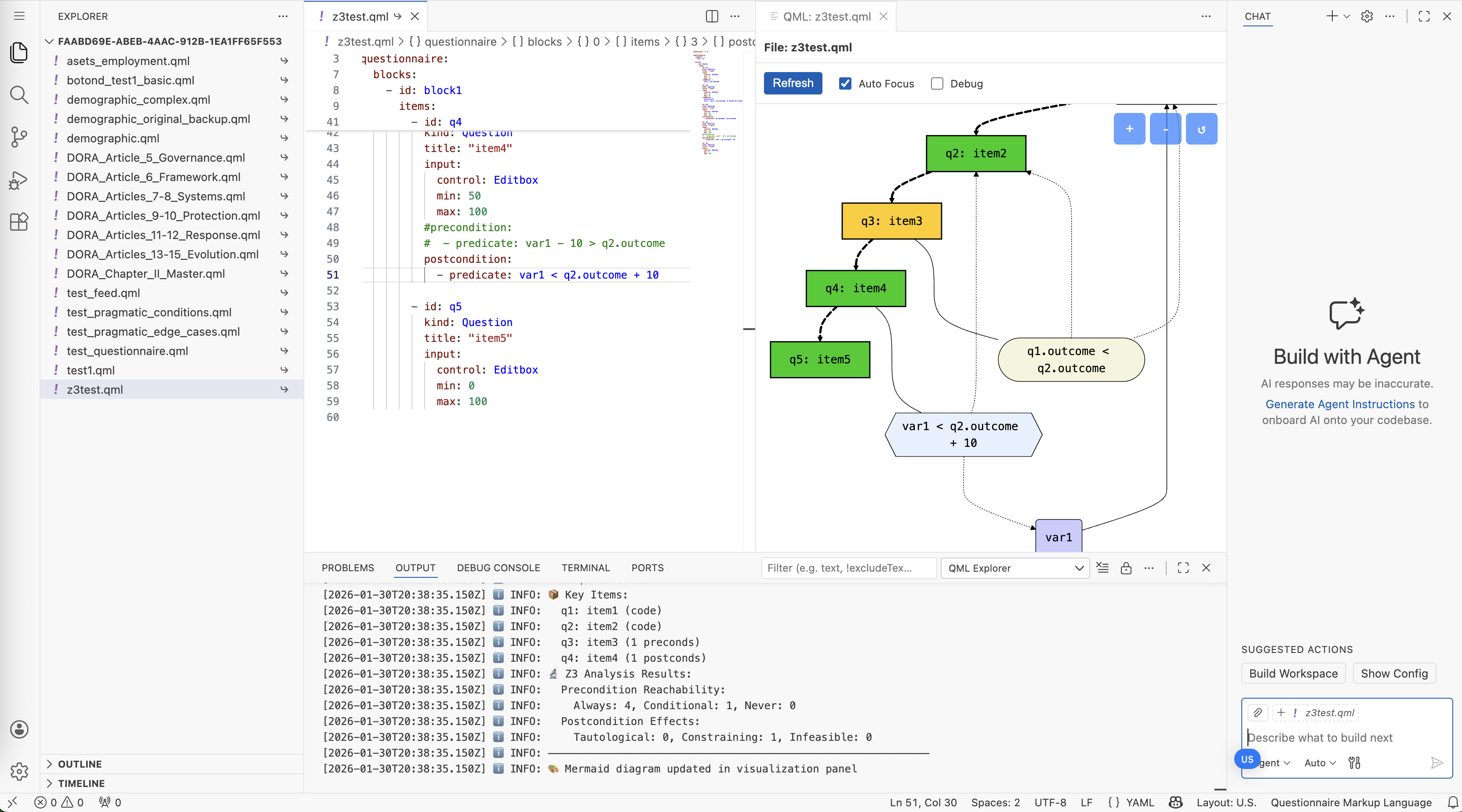
The Armiger interface showing AI assistant (left), source documents (center), and questionnaire visualization (right).
File Browser
The sidebar includes a Files panel that displays workspace files organized by source:
| Source | Description | Permissions |
|---|---|---|
| Organization | Shared QML templates and reference documents available to all users | Read-only |
| Project | QML files scoped to a specific project | Read-write |
| User | Personal files in the workspace root | Read-write |
From the file browser you can:
- Browse files across all three tiers with source indicators
- Upload documents and questionnaire templates to organization-level shared folders
- Index documents for AI semantic search (required before
@-referencing in chat) - Import an existing QML file to start AI generation directly in Phase 2
Import from Existing QML
If you already have a QML file and want AI help refining it, you can skip the research phase entirely:
- Select a QML file from the file browser
- Click Import to AI — this creates a new session starting directly in the Design phase
- The Designer Agent loads the existing QML and is ready for your modification requests
This is useful when you want to iterate on an existing questionnaire rather than building one from scratch.
AI Panel Features
| Feature | Description |
|---|---|
| Project selector | Choose which project to scope documents and sessions to |
| Phase indicator | Shows current phase (Research or Design) with visual badge |
| Chat interface | Natural language interaction with both Research and Designer agents |
| Document upload | Drag-and-drop source documents for semantic indexing |
| Live preview | See generated QML update in real-time |
| Validation status | Instant feedback on SMT validation results |
| Approval button | Review and approve the research document to transition to Design |
| Regenerate QML | Start fresh generation with insights from previous conversation preserved |
| Reset to Research | Return from Design phase back to Research for further document analysis |
| Cancel | Stop an in-progress agent turn |
Project Selector
The AI panel header includes a project selector dropdown that determines the scope of the session:
- In non-private organizations, the user's default project is automatically selected when starting a new session
- Users can switch to a different project, which starts a fresh conversation scoped to that project's documents
- In private organizations, documents are shared org-wide regardless of project selection
Code Synchronization
Changes made by the Designer Agent are synchronized with the code editor:
- AI-generated code appears with highlighting
- Manual edits trigger re-validation
- Conflict resolution for concurrent changes
- Version history with rollback capability
Related Documentation
- QML Syntax Reference - Complete QML language specification
- Creating Surveys - Manual survey creation guide
- Organization-Based Data Sharing - Document isolation by project
- Questionnaire Analysis - Mathematical foundations
- Comprehensive Validation - Validation theory
- AI-Assisted Campaign Management - Using AI for campaign setup